-
Shop
- Adidas
- Advanced Technologies
- AI Skills for Creators & Freelancers
- AI Client Management
- AI Ethics
- AI Mindset
- AI Tools & Prompts
- AI Writing & Content Creation
- Audio, Voice & Music
- Design & Visual Creation
- Email, Messaging & Communication
- Freelancing & Business
- Marketing, Ads & Conversion
- Productivity, Workflow & Automation
- SEO & Search Optimization
- Social Media Content & Growth
- Strategy, Planning & Analytics
- Video Creation & Editing
- AI Skills Mastery 2026 Collection
- Armani
- Bathroom
- Best-Sellers
- Black Friday Sale
- Bonding & Special Moments
- Business & Digital Skills
- Calvin Klein
- Car Accessories
- Confidence
- Dating & Social Skills
- Digital Resources
- AI & Technology
- Beauty
- Car Buying & Ownership
- Cozy Feast Collection
- Electronics & Technology
- Entrepreneurship & Business Growth
- Financial Education
- Hobbies
- Home Styling & Organization
- Kitchen & Recipes
- Mindset
- Online Business
- Online Business for Beginners
- Parenting & Child Development
- Personal Style & Fashion
- Pet Lifestyle & Wellness
- Smart Life with AI
- Travel & Adventure
- Travel Planning
- Wellness
- Yoga & Fitness
- Education & Learning
- Family & Home
- Family & Parenting
- Fashion
- Fashion & Beauty
- Fashion Accessories
- Furniture
- Gadgets
- Guess
- Halloween
- Candles
- Costumes & Makeup
- Fall Family Traditions
- Glasses
- Halloween Costumes & Accessories
- Halloween Decor
- Halloween DIY Products
- Halloween Gifts
- Halloween Home Decor
- Halloween Kids Products
- Halloween Party Hosting
- Halloween Pet Products
- Halloween Teacher Resources
- Kids' Halloween Activities
- Masks
- Party Supplies
- Seasonal Business Ideas
- Small Business Marketing
- Tableware
- Treats & Recipes
- Health & Beauty
- Health & Safety
- Health & Wellness
- Home & Environment
- Home & Garden
- Home Decor
- Home Electronics
- Home Supplies
- Kids & Babies
- Kitchen
- Lighting
- Luxury Brands Collection
- Patio, Lawn & Garden
- Personal Growth
- Personal Growth & Wellness
- Pet Care
- Pet Supplies
- Pets
- Sport & Outdoors
- St. Valentine's Day
- Stress Relief & Relaxation
- Super Deals
- Thanksgiving Digital Collection
- AI & Tech-Enhanced Thanksgiving
- Budgeting & Smart Shopping
- Eco-Friendly & Sustainable Thanksgiving
- Family & Kids
- Gift Ideas Guides
- Gratitude & Mindfulness
- History & Meaning
- Hosting & Planning
- Leftovers & Storage
- Pets & Thanksgiving
- Social Media Captions & Ideas
- Thanksgiving DIY Ideas
- Thanksgiving Recipes
- Thanksgiving Products
- Tommy Hilfiger
- Training & Enrichment
- Travel
- Turnkey Online Businesses
- Wealth
- Wealth Building
How to Create Your Own Memory Book Step by Step
59% off on product page · save $21.98
How to Create Your Own Memory Book Step by Step

Choose a Theme and Gather Materials
Start by deciding whose memories you want to preserve and what period or occasion the book will cover, such as a baby’s first year, a family vacation, or a collection of everyday moments. A clear theme makes it easier to select photos and keepsakes without feeling that you need to include everything.
For a physical book, gather a notebook or scrapbook, printed photos, pens, and photo-safe adhesive; for a digital book, collect image files and written notes in one folder. You can also include copies of drawings, letters, tickets, or other small mementos that help tell the story.

Organize Your Story
Arrange your materials in chronological order, by person, or around themes such as family traditions and favorite places. Before attaching anything, lay out a few pages or create a rough digital outline so you can see where the story begins, what belongs together, and where you may want to leave room for more.
Add short captions with names, dates, locations, and the details you remember, even if a photo seems self-explanatory now. You might also invite relatives or friends to share a sentence about a moment, giving the book different perspectives without requiring a long written account.

Featured in this guide
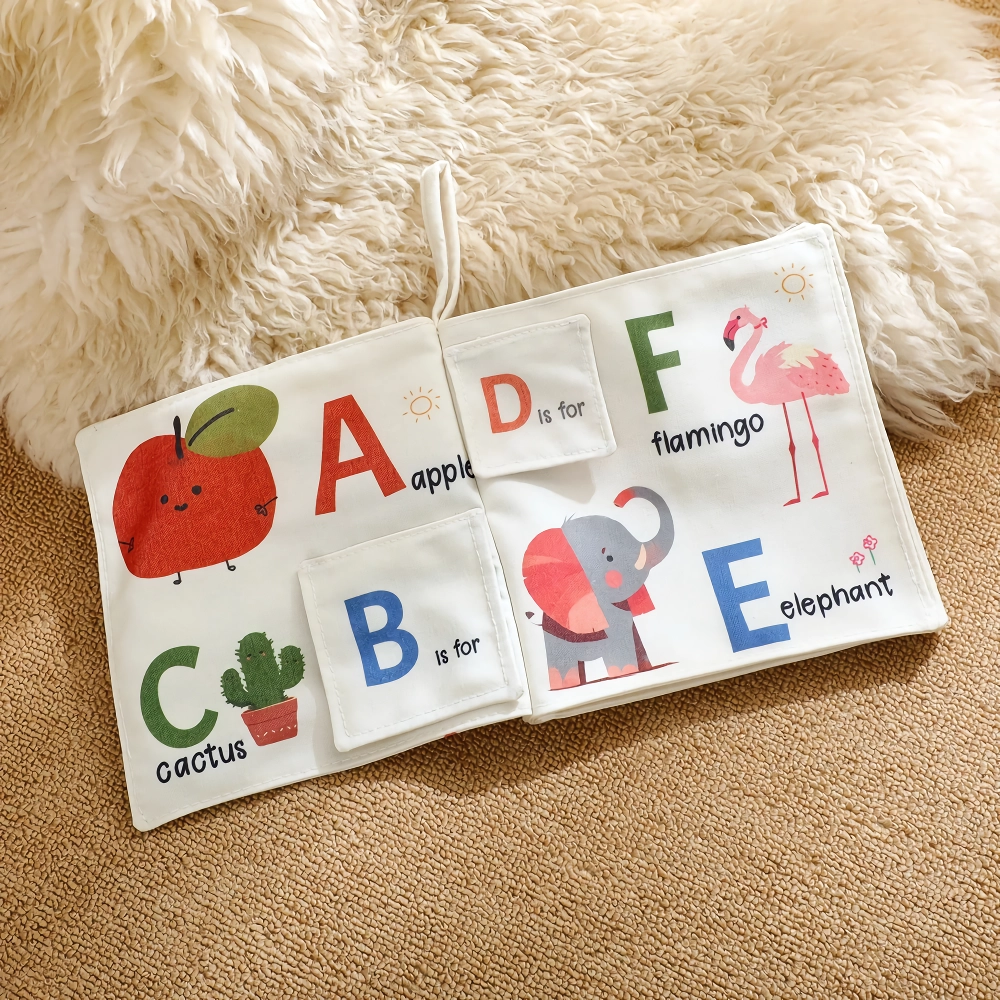
Baby Cloth Book with Ocean Animals & English Words – Early Learning Toy
Build and Personalize the Pages
Give each page or spread a focus, then combine a few images with enough writing to explain why the moment matters to you. Mix larger photos with smaller keepsakes, and leave some open space so the pages remain easy to read rather than feeling crowded.
If you are making a baby memory book, you could record milestones, favorite routines, and stories about playtime alongside photos. For another way to share stories with a little one, explore our Baby Cloth Book with Ocean Animals & English Words, an early learning toy in our Kids & Babies collection.
Protect and Share Your Book
Let adhesive and ink dry before closing a physical book, and store it somewhere cool and dry, away from direct sunlight. Consider using copies of irreplaceable documents or photographs in your pages so you can keep the originals separately.
For a digital book, save a backup of the finished file and the original images before sharing or printing it. Our team recommends reviewing names and dates with anyone involved and asking permission before sharing personal stories or pictures beyond your family.
FAQ
Can I create my own memory book?
Yes, you can make a memory book from a blank notebook, a scrapbook, or a digital document using photos and stories you choose. Start with one occasion or a short period of time, then add pages as more memories come to mind.
Can I create a memory book online for free?
Yes, you can use a free document or presentation tool to arrange photos and captions into pages. Check the tool’s sharing and export options before you begin, especially if you want to download or print the finished book.
See if Baby Cloth Book with Ocean Animals & English Words – Early Learning Toy fits your setup
Was this article helpful?
Yes
No

Leave a comment